

How To Reset Odometer On Toyota
If you’ve ever wondered how to reset the odometer on your Toyota, you’re not alone. Whether you want to track a trip distance or fix a minor glitch, knowing the right steps can save you time and frustration.
You’ll discover simple, clear instructions that anyone can follow. By the end, you’ll feel confident managing your Toyota’s odometer like a pro. Keep reading to learn exactly what you need to do.
Resetting Trip Odometer
Resetting the trip odometer on your Toyota helps track your travel distance easily. It shows the distance driven since the last reset. This feature is useful for measuring trips or fuel efficiency.
Resetting is quick and requires no special tools. Just follow simple steps to clear the trip data. This keeps your readings accurate for every journey.
Locate Trip Odometer Button
Find the trip odometer button on the dashboard or near the speedometer. It is usually labeled as “Trip” or “TRIP.” In some models, it might be a small knob or a push button.
Check your Toyota’s manual for exact location if unsure. The button is easy to press and designed for frequent use.
Steps To Reset Trip Odometer
Turn on your Toyota’s ignition, but do not start the engine. Press the trip odometer button until the trip reading appears on the display.
Hold the button down for a few seconds. The trip odometer resets to zero automatically. Release the button once the numbers clear.
Repeat the process to reset other trip meters if your car has multiple trip readings.
Credit: www.reddit.com
Resetting Maintenance Light
The maintenance light on a Toyota signals when it is time for a service. Resetting this light after completing maintenance keeps the dashboard accurate. This process helps avoid confusion and unnecessary visits to the mechanic.
Resetting the maintenance light is simple. It involves using the dashboard controls to clear the reminder. This section explains the steps clearly for easy understanding.
Accessing The Dashboard Menu
Start by turning the ignition to the ON position without starting the engine. Use the buttons on the steering wheel or near the dashboard to find the settings menu. Look for the maintenance or vehicle settings option. Navigating carefully helps avoid mistakes.
Reset Procedure For Maintenance Light
After accessing the maintenance menu, select the option to reset the maintenance light. Confirm your choice by pressing and holding the reset button. Hold it until the light turns off or the display shows confirmation. Turn off the ignition and then start the engine to check if the light stays off.
Resetting Digital Odometer
Resetting the digital odometer on a Toyota is a simple process. It helps track trip distance or clear previous trip data. This feature is useful for monitoring fuel usage and travel distances during trips.
Digital odometers store mileage electronically. They can be reset under certain conditions. Understanding when and how to reset this reading is important for accurate tracking.
When Resetting Is Possible
Resetting a Toyota’s digital odometer is only possible for the trip meter, not the main odometer. The main odometer records the total mileage and cannot be changed. The trip meter shows distance traveled during a specific trip. This trip meter can be reset anytime to zero.
Resetting is allowed when you want to measure new trip data. It helps track distance for fuel economy or travel purposes. Resetting the main odometer is illegal and not supported by the vehicle.
Steps To Reset Digital Odometer
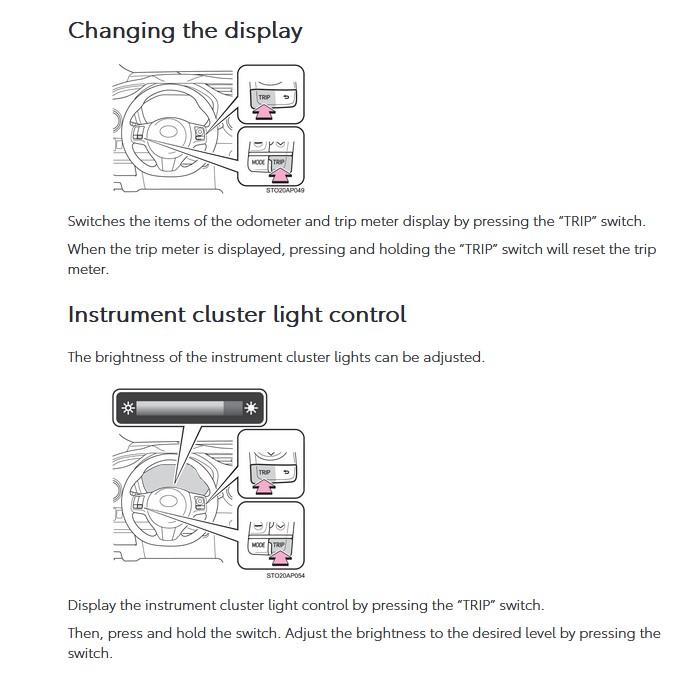
Start by turning on the ignition without starting the engine. Locate the trip meter button on your dashboard or steering wheel. Press and hold the trip meter button for a few seconds. Watch the display; the trip meter will reset to zero.
If your model has multiple trip meters, press the button to switch between them. Reset each one as needed by holding the button down. This process works for most Toyota models with a digital display.
Always check your owner’s manual for model-specific instructions. Resetting the trip meter regularly helps track your travel and fuel use easily.
Using Diagnostic Tools
Using diagnostic tools is a common method to reset the odometer on Toyota vehicles. These tools connect to your car’s computer system and help clear or update mileage data. This process often requires special equipment and some technical knowledge. Understanding the basics of these tools is important before starting.
Obd-ii Scanner Basics
An OBD-II scanner is a device that reads data from a car’s onboard computer. Toyota vehicles built after 1996 use this system. The scanner plugs into a port usually located under the dashboard. It retrieves information about the engine, sensors, and mileage. Some scanners also allow you to reset the odometer. Basic models show error codes, while advanced ones can perform resets and programming.
Resetting Odometer Via Diagnostic Tool
First, connect the OBD-II scanner to the port under your dashboard. Turn the ignition key to the “On” position but do not start the engine. Follow the scanner’s instructions to navigate to the odometer or mileage menu. Select the option to reset or adjust the odometer reading. Confirm the action and wait for the process to finish. After completion, turn off the ignition and disconnect the scanner. Always check local laws before resetting an odometer, as it may be illegal in some places.
Legal And Safety Considerations
Resetting the odometer on a Toyota involves important legal and safety issues. The odometer shows how many miles the vehicle has traveled. This number affects the car’s value and helps track maintenance. Changing the odometer reading can cause problems if not done correctly or legally.
Legal Restrictions On Odometer Reset
Odometer tampering is illegal in many places. Laws protect buyers from false mileage claims. Changing the odometer to show fewer miles can lead to fines and penalties. It may also cause legal trouble when selling the car. Only authorized repairs or replacements by a dealer are allowed. Any odometer change must be reported to avoid fraud.
Ensuring Accurate Mileage Records
Keeping correct mileage records is very important. It helps maintain the car’s history and value. Service centers use mileage to schedule repairs and checkups. Accurate records protect buyers and sellers. Always document any odometer changes. This keeps trust and safety on the road. Never reset the odometer without proper reason and approval.

Credit: www.youtube.com
Common Issues And Troubleshooting
Resetting the odometer on a Toyota can sometimes lead to issues. These problems can stop the reset process or cause errors on the dashboard. Knowing common issues helps fix them fast. Troubleshooting saves time and avoids frustration.
Odometer Not Resetting
The odometer might not reset due to a few reasons. First, the reset button could be faulty or worn out. Pressing it may not register the command. Second, the car’s battery might be low or disconnected recently. This can interrupt the reset process. Third, some Toyota models need a special procedure or tool to reset the odometer. Trying the wrong method will not work. Always check your car’s manual for the correct steps.
Dashboard Display Problems
Sometimes the dashboard may not show the odometer reading correctly. The display might flicker, stay blank, or show incorrect numbers. This can happen if the dashboard fuse is blown or loose. Electrical issues inside the dashboard are another cause. Moisture or dirt can damage the display unit. Cleaning the unit or replacing the fuse often helps. If the problem stays, a professional check is needed to avoid further damage.
Credit: www.toyotaownersclub.com
Frequently Asked Questions
How Can I Reset The Odometer On My Toyota?
Resetting the odometer on a Toyota usually involves disconnecting the battery or using a diagnostic tool. However, most Toyota vehicles have a non-resettable odometer for legal reasons. Always consult your vehicle manual or a professional before attempting any reset.
Is It Legal To Reset A Toyota Odometer?
No, resetting an odometer to alter mileage is illegal in many places. It is considered fraud and can lead to severe penalties. Always ensure odometer readings remain accurate to maintain vehicle value and comply with the law.
Can I Reset The Trip Meter On Toyota?
Yes, resetting the trip meter on a Toyota is simple. Press and hold the trip meter reset button until the display resets to zero. This does not affect the main odometer reading and is used to track individual trip distances.
What Tools Do I Need To Reset Toyota Odometer?
Most Toyota odometers cannot be reset manually. Specialized diagnostic tools or software may be required for service purposes. Unauthorized resets are illegal; only certified technicians should perform odometer-related tasks.
Conclusion
Resetting the odometer on your Toyota is a simple task. Follow the steps carefully to avoid mistakes. Always double-check your work before finishing. This helps keep your vehicle information accurate. Remember, proper maintenance keeps your Toyota running well. Stay safe and enjoy driving with confidence.


