

How To Reset Maint Reqd Toyota Tacoma
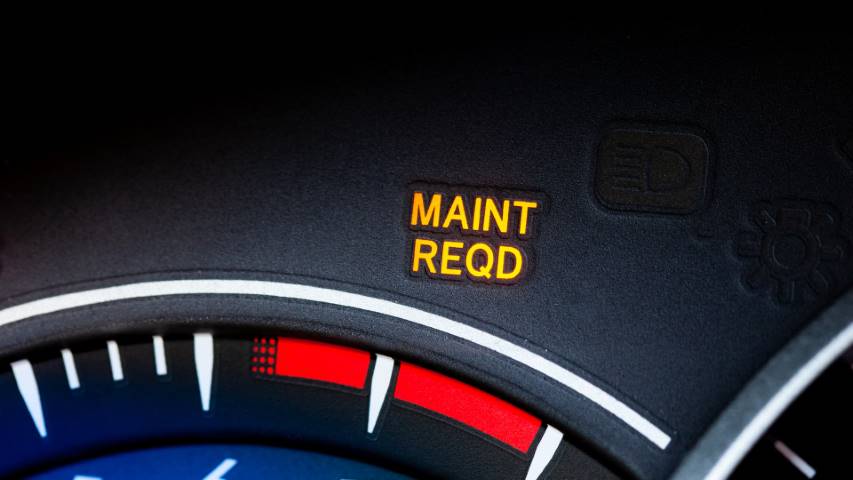
If you drive a Toyota Tacoma, you’ve probably seen that “Maint Reqd” light pop up on your dashboard. It can be confusing and a bit annoying, especially if you’re not sure what it means or how to turn it off.
But don’t worry—resetting this reminder is easier than you think. You’ll learn simple, step-by-step instructions to reset the “Maint Reqd” light yourself, saving you time and a trip to the mechanic. Keep reading, and you’ll have your Tacoma’s dashboard clear and ready to go in no time.

Credit: www.reddit.com
Resetting Maint Reqd Light
Resetting the Maint Reqd light on a Toyota Tacoma is simple and quick. Turn the key to the “ON” position, press the odometer button, and hold it until the light turns off. This resets the reminder after your vehicle maintenance.
The “Maint Reqd” light on a Toyota Tacoma reminds you to service your truck. It usually turns on after 5,000 miles to prompt an oil change or basic maintenance. Resetting this light clears the reminder and resets the system. This helps keep track of future service needs. Resetting is simple and does not require special tools or skills. Follow clear steps to turn off the light safely.
When To Reset The Light
Reset the “Maint Reqd” light only after completing vehicle maintenance. This includes an oil change or checking other fluids and filters. Resetting before service can cause confusion and missed maintenance. The light should turn off automatically after the reset process. If the light stays on, check if the maintenance was done properly. Keep the truck running smoothly by resetting the light at the right time.
Tools Needed
Most Toyota Tacoma models do not need special tools to reset the light. You only need the truck’s ignition and dashboard controls. Some models may require a steering wheel button or odometer reset. No extra equipment or diagnostic tools are necessary. Just use the truck’s built-in controls and follow the reset steps. This makes resetting quick and easy for any Tacoma owner.

Credit: www.youtube.com
Reset Procedure For Toyota Tacoma
Resetting the Maintenance Required (Maint Reqd) light on your Toyota Tacoma is simple. This light reminds you to service your truck. After completing maintenance, reset the light. This helps track future service needs. Two common methods work well. Choose the one that suits your model and tools.
Using The Odometer Button
Turn the ignition to the “On” position. Do not start the engine. Press the odometer button to show the total mileage. Hold down the odometer button. Keep holding it for about 5 seconds. The Maint Reqd light will start to blink. Release the button once the light turns off. Turn off the ignition. Turn it back on to check the reset.
Using The Key Method
Insert the key into the ignition. Turn the key to the “On” position without starting the engine. Press the gas pedal fully three times within five seconds. The Maint Reqd light will begin to blink. Wait for the light to turn off. Turn off the ignition. This resets the maintenance reminder light. Start the engine to confirm the reset.
Troubleshooting Reset Issues
Resetting the Maintenance Required light on a Toyota Tacoma usually works smoothly. Sometimes, the light stays on even after you reset it. This section helps you troubleshoot common reset problems. Follow these tips to solve issues quickly and easily.
Light Stays On After Reset
The light might stay on if the reset process was not done correctly. Try turning the key to the “On” position without starting the engine. Press and hold the trip meter reset button until the light blinks and goes off. If the light remains, repeat the steps carefully.
Another reason could be a stored error in the car’s computer. Use an OBD-II scanner to check for any codes. Clearing these codes might turn off the light. If not, visit a mechanic for a deeper check.
Battery And Electrical Checks
Weak battery power can cause the Maintenance Required light to malfunction. Check the battery voltage with a multimeter. A healthy battery should read about 12.6 volts when the engine is off.
Loose or corroded battery terminals can also affect the reset. Clean and tighten the connections for better power flow. Inspect fuses related to the instrument panel and engine control module. Replace any blown fuses to fix electrical issues.
Maintenance Tips For Toyota Tacoma
Maintaining your Toyota Tacoma is key to keeping it running smoothly. Regular care helps avoid costly repairs and keeps your truck reliable. Simple steps can make a big difference in your vehicle’s life.
Follow these maintenance tips to protect your Tacoma and enjoy a safer drive.
Regular Oil Changes
Change your oil often. This keeps the engine clean and working well. Old oil can cause damage and reduce fuel efficiency. Check the owner’s manual for the right oil type and change intervals. Usually, every 5,000 miles is a good rule. Clean oil helps your engine last longer and run smoother.
Scheduled Service Intervals
Stick to the service schedule Toyota recommends. This includes checking brakes, tires, fluids, and other parts. Scheduled services catch small problems early before they become big. Your Tacoma’s manual lists when to do each check. Following this keeps your truck safe and in top shape. It also helps maintain your vehicle’s value over time.
When To Visit A Mechanic
Knowing when to visit a mechanic is important for your Toyota Tacoma. Sometimes, the “Maint Reqd” light resets but problems still exist. A mechanic can find hidden issues that affect your truck’s safety and performance. Acting early can save you from costly repairs and keep your vehicle running smoothly.
Persistent Warning Lights
If the “Maint Reqd” light stays on after a reset, see a mechanic. Other warning lights on your dashboard also need attention. These lights can signal serious engine or system problems. Ignoring them can lead to breakdowns or damage. A mechanic can diagnose the exact cause and fix it.
Unusual Vehicle Performance
Notice strange noises or poor acceleration? Your Tacoma might have deeper issues. Rough idling, stalling, or trouble starting are warning signs too. These problems can affect your safety on the road. A mechanic can check your engine and other parts carefully. Early repairs help maintain your truck’s reliability and value.
Credit: www.whipflip.com
Frequently Asked Questions
How Do I Reset The Maint Reqd Light On Toyota Tacoma?
To reset the Maint Reqd light, turn the ignition to ON without starting. Press the odometer button until the mileage appears. Turn off the ignition, then press and hold the odometer button while turning the ignition back to ON. Hold until the light resets.
Why Does The Maint Reqd Light Stay On After Service?
The Maint Reqd light stays on if the system was not reset after service. It signals scheduled maintenance every 5,000 miles. Resetting the light manually after oil change or maintenance clears the alert.
Can I Reset Maint Reqd Without A Scanner Tool?
Yes, you can reset the Maint Reqd light without a scanner. Use the odometer button and ignition key method. This manual reset works for most Toyota Tacoma models without special tools.
How Often Should I Reset The Maint Reqd Light?
Reset the Maint Reqd light every 5,000 miles after scheduled maintenance. It reminds you to change oil and perform routine checks. Regular resetting keeps your Tacoma’s maintenance on track.
Conclusion
Resetting the Maint Reqd light on your Toyota Tacoma is simple and quick. This small task helps keep your truck running smoothly. Regular resets show you care about maintenance. Following the steps ensures no confusion or errors. Keep an eye on your vehicle’s alerts.
Stay safe and save money by acting early. Now you can handle this reset with confidence. Your Tacoma deserves good care and attention. Easy, right?


